Two-factor authentication means signing in with two separate proofs of identity: something you know, like a password, and something you have, like your phone. Turn it on first for your email account. Email is the reset door to nearly everything else, so protecting it protects the rest.
The second-best step is to pick the right type of second factor. Text-message codes are the easiest to use and the easiest for a thief to hijack. An authenticator app or a hardware security key is harder to steal, and the difference matters more than most people realize.
This guide explains how two-factor authentication works, what each method costs you in convenience, and the practical order to enable them. The name itself is literal: as Merriam-Webster defines it, "two" means one more than one, and that is exactly the structure — a second, independent check stacked on top of your password.
What exactly is two-factor authentication?
A password is one proof. Anyone who learns it can sign in as you, from anywhere, without touching anything you own. Two-factor authentication adds a second proof from a different category — something you have in your hand or on your person, not something stored in a database that can leak.
The mechanism is simple. After you enter the correct password, the service asks for a second credential: a six-digit code, a tap on a trusted device, or a physical key you plug in. No second proof, no entry. A stolen password alone no longer gets anyone in.
The catch is real but manageable: lose the second factor and you can lock yourself out. Every method below has a recovery path, and setting one up before you need it is part of the job.
Which 2FA methods exist, and how do they differ?
There are three common types, and they are not equally safe.
- SMS codes. The service texts a code to your phone. Easy to use, works on any phone, no app to install. The weakness: the code travels over the phone network and lands on a SIM card, both of which attackers have learned to attack.
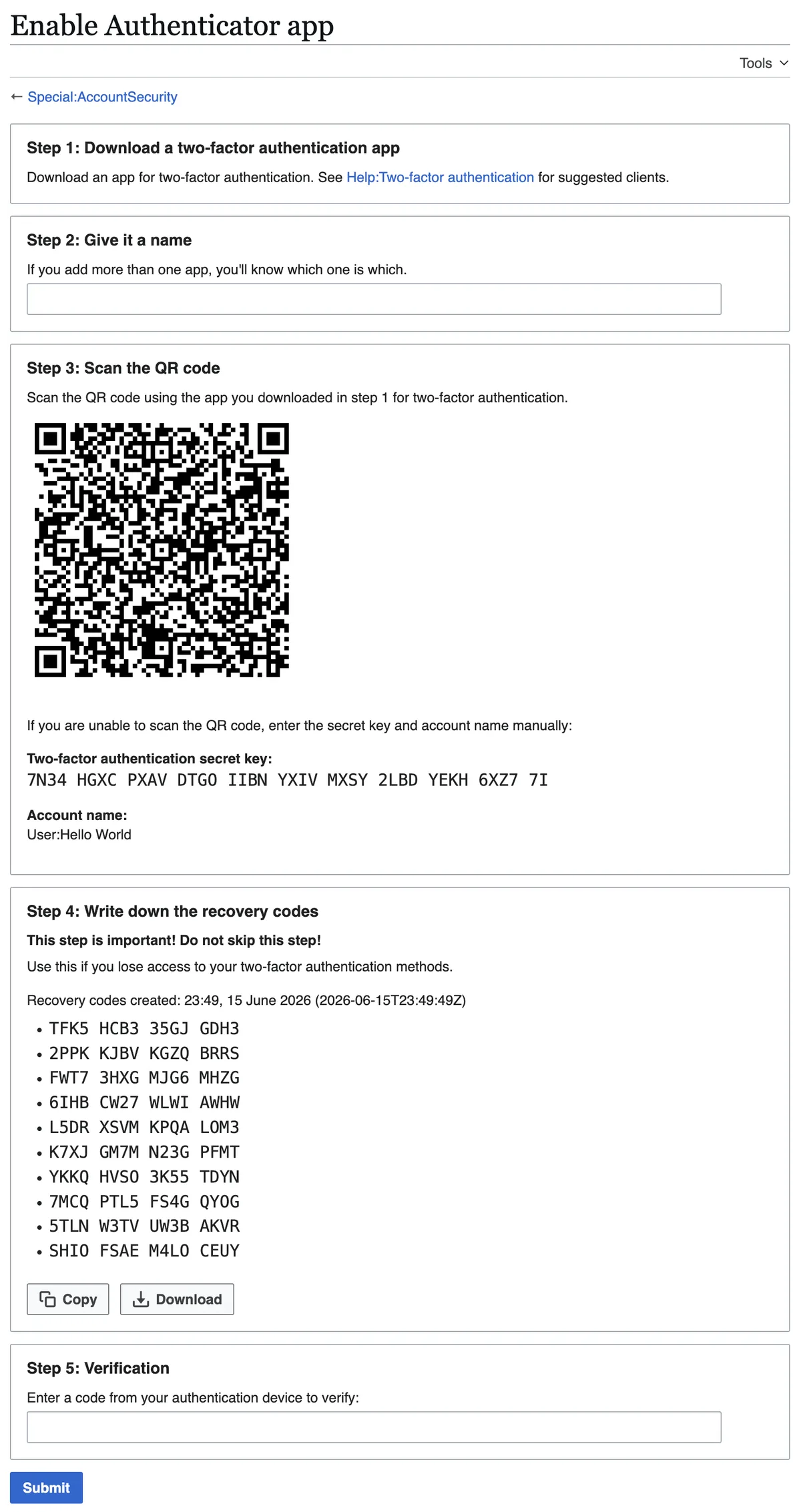
- Authenticator apps. An app on your phone generates a fresh code every 30 seconds or so, with no network involved. Nothing arrives by text, so there is nothing to intercept. The trade-off: set up takes a few more minutes, and you should save the backup codes the service shows you.
- Hardware security keys. A small physical device you plug into or tap against your computer or phone. It verifies the website you are signing into, which blocks fake lookalike sites. Strongest option, small cost, and a spare key is wise in case you lose one.
Push approvals — a prompt on your phone you tap to confirm — sit between apps and SMS in convenience. They are easier than typing codes but can be fatigued: attackers flood you with prompts hoping you approve one by accident. Deny, then change your password if prompts arrive that you did not trigger.
Why are SIM swaps a problem for text-message codes?
A SIM swap is when someone convinces your phone carrier to move your phone number onto a SIM card they hold. They do this by impersonating you — often with personal details leaked in breaches — or by bribing an insider at the carrier. Once your number lives on their SIM, every text meant for you goes to them, including your 2FA codes. We covered a connected angle in How to Tell if a Website Is Secure Before You Enter Your Card Details.
That turns your second factor into the attacker's second factor. The password they already have from a breach; the code now arrives on their phone. This is the specific failure mode that makes SMS the weakest of the three methods, and it is why security guidance consistently ranks authenticator apps above text codes.
SIM swaps are rare relative to password theft, but they are targeted, and the victims tend to be people with valuable accounts — email, banking, crypto. If your carrier offers a port-out PIN or a number-lock feature, setting one up is a sensible extra lock on the door, regardless of which 2FA method you use.
What this means: the order to enable things
Here is our analysis of a sensible sequence, based on how these methods fail in practice.
- Turn 2FA on for your email first. Email is the recovery route for other accounts. Whoever controls your inbox can reset most of your digital life.
- Use an authenticator app rather than SMS where the service offers one. The setup cost is minutes; the protection lasts years.
- Save backup codes when you set 2FA up. Print them or store them offline. They are your way back in if you lose the phone.
- Add a hardware key for your most critical accounts if you want the strongest option. Keep a spare somewhere safe.
- Lock down your phone number too. Ask your carrier about port-out protections. This helps even if you never use SMS codes.
None of this requires technical skill. Every major consumer service walks you through setup in its security settings. If a service offers only SMS, take it anyway — a weaker second factor beats none.
Does 2FA make strong passwords pointless?
No. Two-factor authentication is a second lock, not a replacement for the first. A weak, reused password still creates problems: it can be reset, phished, or used to unlock recovery flows. Pair 2FA with passwords that are long and unique per account.
If remembering dozens of unique passwords sounds impossible, passphrases solve most of it — several unrelated words strung together are both memorable and hard to guess. Our guide to creating strong passphrases you can actually remember walks through the method. A password manager handles the rest.
Phone theft changes the picture slightly. If your second factor lives on your phone, a stolen phone is a stolen key. Locking the device with a strong screen lock and enabling remote-wipe features closes most of that gap; our rundown of Android settings that protect your phone from theft covers the basics. For related coverage, see 5 Android Settings to Turn On Right Now to Protect Your Phone From Theft.
What about the accounts you forget?
The obvious accounts — email, banking, social media — get the attention. The forgotten ones are where trouble starts: an old shopping account with a saved card, a cloud storage service holding years of photos, a smart-home app tied to your smarthome devices. Each is a door an attacker will try with a breached password.
A practical sweep: check the security settings of every app you have used in the past year, enable 2FA where offered, and delete accounts you no longer use. If you are unsure where old accounts linger, our guide on checking whether your data was exposed in a breach explains how breach notifications point you to the accounts most at risk. Clearing out what you do not need pairs well with a weekend digital declutter.
The bottom line
Two-factor authentication is one of the few security steps with a large payoff for a small effort. The evidence-based order: secure your email first, prefer an authenticator app over text codes, store your backup codes offline, and consider a hardware key for the accounts that would hurt most to lose. SMS codes still beat nothing, but the methods that never touch the phone network are harder to steal — and that is the whole game.
What the available evidence does not settle: how often SIM swaps succeed at any given carrier, or which specific services will be targeted next. Those change constantly. The structural advice — a second factor you physically hold, protected by a locked phone number — holds regardless.