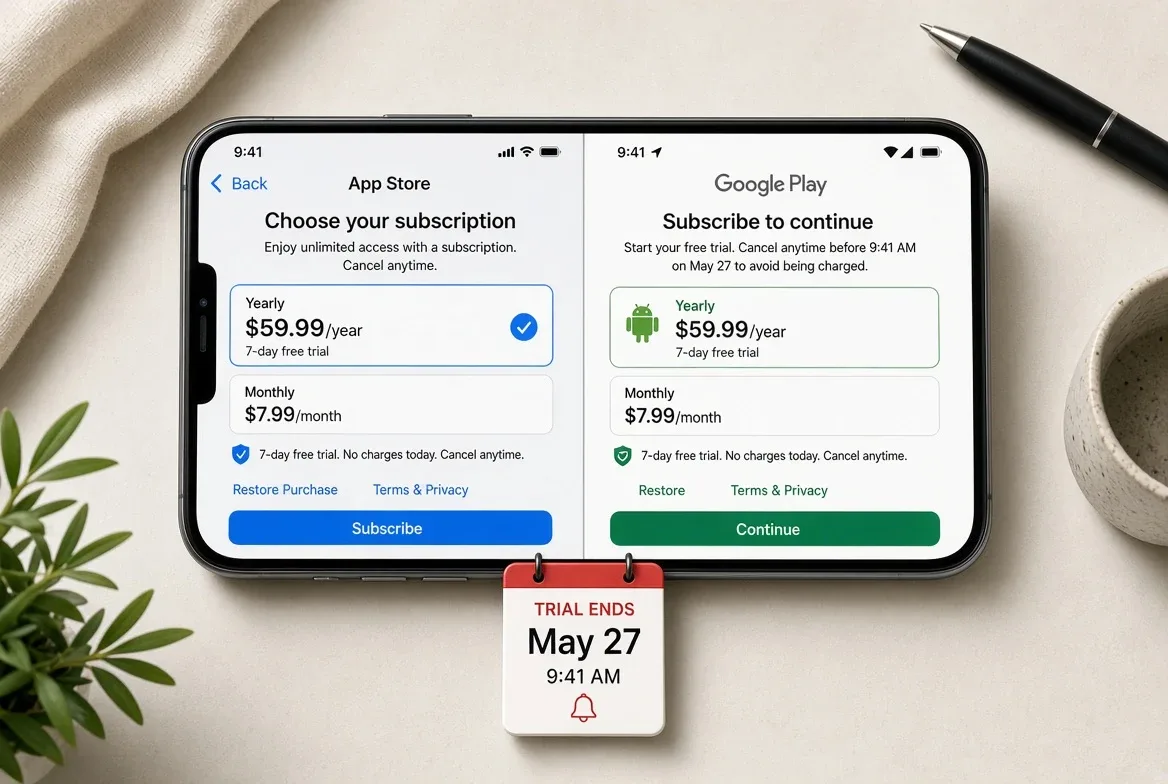
Cancel where you bought it, not where you use it. If the charge comes from Apple, you cancel in your Apple account; if it comes from Google Play, you cancel in Play. Apple's support documentation says to kill a free trial at least 24 hours before it ends. The catch: cancelling almost never gets you an automatic refund.
That distinction is why people cancel inside an app, get charged anyway, and assume they were scammed. Everything below comes from Apple's, Google's and the Federal Trade Commission's own published pages, accessed August 20, 2026.
Who is actually charging me — Apple, Google, or the company?
Check the receipt first. If your emailed receipt comes from Apple, the subscription lives in your Apple Account. If it comes from Google Play, it lives in Play. If neither, you signed up directly with the company and you cancel on its own site.
Apple's cancellation page says as much: if you can't find a subscription, search your email for Apple receipts to confirm which account was billed. It also notes that a subscription bought by a family member must be cancelled by the account holder who made the purchase, and that on Android, Play-billed subscriptions are cancelled through Google Play, not Apple.
How do I cancel on iPhone, iPad, or Mac?
All four routes are documented by Apple. Use the web route if you don't have the device that was billed. Expected outcome after the last step: the subscription shows as expiring rather than renewing.
- On the web: go to account.apple.com, open the subscriptions section, pick the subscription, and cancel.
- On iPhone, iPad, or Apple Vision Pro: Settings, then your name, then Subscriptions, then the subscription, then Cancel Subscription.
- On a Mac: App Store, then your name, then Account Settings, then Subscriptions, then the subscription, then Cancel Subscription.
- On Windows: Apple's page routes you through the Apple Music or Apple TV app's account settings.
The trial rule is the part to diary. Apple's page states plainly: "If you signed up for a free or discounted trial subscription and you don't want to renew it, cancel it at least 24 hours before the trial ends."
How do I cancel on Android?
Open Google Play, go to your subscriptions, select the one you want to end, tap Cancel subscription, and follow the prompts. Google's support page is explicit about what happens next: "When you cancel a subscription you'll still be able to use your subscription for the time you've already paid."
So cancelling an annual plan in month seven does not claw back the remaining five months — it stops the next charge and leaves access running to the paid-through date. Google's page adds that past subscription periods "can't be refunded, with some exceptions," and that prepaid plans are refundable only while the plan is unused.
Apple versus Google: what differs
| Apple | Google Play | |
|---|---|---|
| Where you cancel | account.apple.com, iOS Settings, or Mac App Store | Google Play subscriptions screen |
| Trial deadline stated | At least 24 hours before the trial ends | Not stated on the cancellation page |
| Access after cancelling | Not stated on the cancellation page | Runs through the period already paid for |
| Refund request route | reportaproblem.apple.com | Play refund request, then the developer |
| Documented refund window | Not stated; eligibility varies by country or region | 48 hours for apps, games, and in-app purchases |
Can I get my money back after I've been charged?
Sometimes, and you have to ask. Neither store refunds you automatically for cancelling. Both run a request process, and both reserve the decision.
On Apple, the documented route is reportaproblem.apple.com: choose "I'd like to," then "Request a refund," pick a reason, pick the item, and submit. Apple's page says the charge must be posted rather than pending, that a status update typically takes 24 to 48 hours, and that eligibility varies by country or region.
On Google Play, the documented window is tighter and clearer. Google's refund policy for apps, games, and in-app purchases says that within 48 hours of the purchase you may be able to get a refund; after 48 hours, it directs you to contact the developer. Two limits worth knowing: a refund means losing access to the item, and Google says you can only request a refund once per app or game — buy it again and it is no longer eligible. Google's general refund page also notes that outcomes vary by product type, purchase date, payment method and location, that most Play apps come from third-party developers rather than Google, and that donations to nonprofits are non-refundable.
What if the company won't let me cancel?
Escalate outside the app. The FTC's consumer guidance is blunt on the standard: "Businesses must make canceling simple for you. It's the law."
The agency's advice, in order: follow the company's stated cancellation instructions and keep documentation; watch your statements for charges that keep landing; dispute them with your card company; and follow up by certified mail to preserve your rights. If charges continue, the FTC directs you to report the problem at ReportFraud.ftc.gov and to your state attorney general. It also warns that renewal notices asking you to re-enter financial details can be fakes.
What these sources don't settle
Three honest gaps. Neither cancellation page is pinned to a numbered OS release, so the menu names above reflect the pages as published at the time of access — expect different wording on older iOS, macOS or Play versions. Apple's cancellation page doesn't say whether access continues to the paid-through date the way Google's does, and doesn't cover refunds at all. And neither company publishes the criteria behind an individual refund decision, so nothing here supports predicting your odds.
If you subscribe through one store only, set a calendar reminder a day before any trial ends and cancel from the store, not the app. If your household is split across iPhone and Android, check the receipt every time before you go hunting for a cancel button — the same app can bill through either store depending on where it was bought.
For a related apps perspective, read How to Stop Apps from Tracking You Across Other Apps on Your iPhone.
For more context, read How to set up a passkey and stop relying on passwords.
For more context, read Apple Inc. Plans: Research and Apple.
For more context, read Apple Inc.: Apple and Autonomous.